
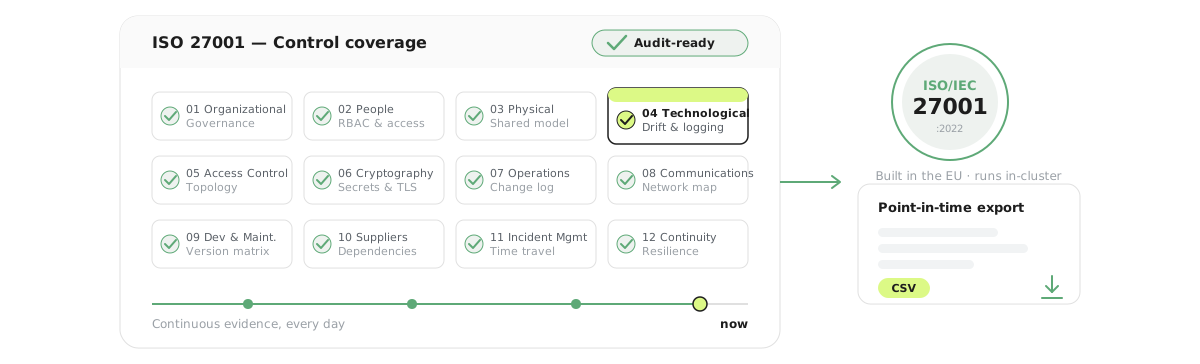
ISO/IEC 27001 certification is the gold standard for information security management. But for organizations running cloud-native infrastructure, turning that standard into continuous compliance is a different challenge entirely.
This post explores the 12 control areas of ISO 27001:2022, the specific pains they create for teams operating Kubernetes clusters, and how CloudInspector can help you turn a once-a-year audit scramble into a continuous, evidence-backed process.
If your ISO 27001 implementation keeps stalling on audit evidence, this is for you.
The Certification Treadmill Nobody Talks About
Getting ISO 27001 certified is one thing. Staying certified is another.
For many organizations, whether it’s a 20-person SaaS startup or a 2,000-person enterprise, the annual surveillance audit triggers a familiar ritual: weeks of scrambling through log exports, manually documenting infrastructure states, chasing down asset lists, and hoping nothing critical changed since the last audit cycle.
The fundamental problem is architectural: ISO 27001 demands a continuous improvement mindset, but most tooling only delivers point-in-time snapshots.
This gap is especially painful for organizations running Kubernetes. Clusters are inherently dynamic. Pods spin up and down, namespaces multiply, configurations drift, image versions change. A screenshot of your cluster from last Tuesday tells you nothing about what it looked like during the incident three months ago, and it certainly won’t satisfy an auditor asking for evidence of ongoing control effectiveness.
CloudInspector was built to close this gap, starting with Kubernetes, with cloud provider coverage (AWS, GCP, Azure) on the roadmap, by constantly recording assets.
CloudInspector provides time travel asset map and point-in-time or periodic reports for seamless evidence documentation. Think of it as a CMDB that updates itself: an automated, continuous inventory of everything running in your cluster.
Understanding the 12 Control Areas of ISO 27001:2022
The 2022 revision of ISO 27001 reorganized its Annex A controls into 93 individual controls grouped across 4 themes: Organizational, People, Physical, and Technological. When mapped to practical compliance domains, these controls span 12 distinct operational areas that every certified organization must address:
| # | Control Area | Core Obligation |
|---|---|---|
| 1 | Organizational Controls | Governance, policies, roles, and risk management |
| 2 | People Controls | Security awareness, responsibilities, and HR security |
| 3 | Physical Controls | Facilities, equipment, and physical access |
| 4 | Technological Controls | Technical security measures, logging, and access enforcement |
| 5 | Access Control | Identity, authentication, and authorization |
| 6 | Cryptography | Encryption and key management |
| 7 | Operations Security | Secure operations, monitoring, and change management |
| 8 | Communications Security | Network security and data transfer protection |
| 9 | System Acquisition, Development & Maintenance | Secure SDLC and vulnerability management |
| 10 | Supplier Relationships | Third-party risk and cloud provider responsibilities |
| 11 | Incident Management | Detection, reporting, and response |
| 12 | Business Continuity & Resilience | Availability, recovery, and resilience planning |
Each of these areas has a direct translation to operational pain in a Kubernetes environment. Let’s go through them one by one.
Control Area 1: Organizational Controls
The obligation: Establish governance structures, information security policies, defined roles, and a functioning risk management process. Provide documented evidence that policies are enforced and reviewed.
The Kubernetes pain: Clusters grow organically. Teams add namespaces, deploy workloads, and reconfigure resources without always going through formal change governance. By audit time, the actual state of the infrastructure often diverges significantly from what the documentation says it should look like. Nobody has a clean, current picture of who owns what, what runs where, or how assets relate to each other.
How CloudInspector helps: CloudInspector continuously builds a structured model of your Kubernetes cluster — every workload, every namespace, every resource relationship — updated in near real-time. This gives you an always-current asset inventory, a CMDB that updates itself, and that can serve as the authoritative source of truth for governance documentation. Ownership can be tracked at the resource level, so auditors and governance leads can always answer:
What runs in our environment, who owns it, and what does it depend on?
The Ownership Overview feature surfaces ownership attributes from resource metadata and propagates ownership through the dependency graph, so even resources without explicit labels inherit their owner context from parent objects.
Control Area 2: People Controls
The obligation: Ensure security responsibilities are defined, staff are security-aware, and that privilege is granted only where necessary. Detect and address violations of security policies.
The Kubernetes pain: It is easy to grant broad Kubernetes RBAC roles during development and forget to tighten them. Service accounts accumulate permissions. Long-lived tokens linger. In fast-moving teams, nobody regularly audits who or what has access to which namespaces and resources.
How CloudInspector helps: CloudInspector’s continuous asset model includes RBAC resources. You can inspect which service accounts exist, what roles they have been granted, and whether those roles appear appropriate for the workloads that use them. Privilege sprawl becomes visible before the auditor finds it. Combined with the Ownership Overview, you can quickly identify resources that have no clear human owner — a red flag for both security and compliance!
Control Area 3: Physical Controls
The obligation: Protect physical assets like facilities, hardware, and equipment against unauthorized access and environmental threats.
The Kubernetes pain: When running Kubernetes in a cloud or colocation environment, your organization inherits the cloud or datacenter provider’s physical controls. The challenge is documenting that inheritance clearly and traceable. Auditors want evidence that you understand your shared responsibility model.
How CloudInspector helps: CloudInspector’s asset model makes the infrastructure layer explicit. It surfaces which clusters run on which underlying hardware, enabling you to map your physical control responsibilities to the appropriate provider documentation. The Point-in-Time Export feature lets you capture and archive this mapping at any moment in time, providing auditors with timestamped evidence that the responsibility model was understood and documented.
Control Area 4: Technological Controls
The obligation: Implement and maintain technical security controls trough logging, secure configuration baselines, access enforcement, and continuous monitoring of their effectiveness.
The Kubernetes pain: Kubernetes clusters accumulate configuration drift over time. A security-hardened baseline from initial deployment gradually erodes as teams patch workloads, update configurations, and deploy new services. Without continuous monitoring, drift goes undetected until something breaks or until an auditor asks for configuration evidence.
How CloudInspector helps: This is where CloudInspector’s continuous recording model delivers its most direct value. Because CloudInspector tracks the full state of your cluster over time, you get:
- Change detection: Every configuration change is recorded, timestamped, and browsable. You can answer: What changed between last month and today?
- Drift visibility: Compare the current state of a workload against any historical point to detect deviations from your baseline.
- Version history: The Release History feature shows every version of every Kubernetes object when it appeared, when it changed, and when it was removed.
Auditors asking for evidence of technical controls in place get a verifiable, timestamped record — not a manually assembled spreadsheet.
Control Area 5: Access Control
The obligation: Implement strong identity, authentication, and authorization controls. Restrict access to information and systems based on the principle of least privilege.
The Kubernetes pain: Access control in Kubernetes is multi-layered and complex. RBAC policies, network policies, service account bindings, and ingress rules all interact. A misconfigured ClusterRoleBinding can expose the entire cluster. Public-facing services that should be internal are a perennial issue. Auditors expect not just that access controls exist, but that they are actively monitored.
How CloudInspector helps: CloudInspector’s Kubernetes cluster topology visualization makes access topology visible. You can inspect:
- Which workloads are exposed externally via Services and Ingresses
- Which service accounts are bound to which roles
- Which namespaces have network policies in place — and which do not
The interactive map view immediately shows if a service that should be internal is reachable from outside the cluster. This visual clarity is useful both for day-to-day security operations and for preparing access control evidence for auditors.
Control Area 6: Cryptography
The obligation: Use cryptographic controls to protect the confidentiality and integrity of information. Manage keys and certificates appropriately.
The Kubernetes pain: Kubernetes secrets are base64-encoded by default, not encrypted at rest unless explicitly configured. TLS certificates have expiry dates that are easy to miss at scale. In complex clusters with many services, tracking which workloads use encryption and which certificates are approaching expiry is operationally demanding.
How CloudInspector helps: CloudInspector surfaces Kubernetes Secret resources and their relationships to workloads. Certificate expiry metadata can be tracked as part of the asset model, enabling proactive identification of certificates approaching their validity window before they cause incidents or compliance gaps. The continuous recording model means that cryptographic configuration is not just checked once but tracked over time.
Control Area 7: Operations Security
The obligation: Maintain secure operations through monitoring, documented change management, and controlled operational procedures. Detect and respond to deviations.
The Kubernetes pain: In a dynamic Kubernetes environment, “change management” without tooling is almost impossible. Dozens of deployments can happen in a single day. Documenting what changed, when it changed, and who triggered the change (and then correlating those changes with operational incidents) requires continuous, automated recording.
How CloudInspector helps: The Change Log and Release History features were designed exactly for this use case — a living changelog that doubles as a release manager tool. Every change to the cluster state is recorded and attributed. When an incident occurs, teams can reconstruct the timeline: What changed in the two hours before the outage? Which workload versions were running during the incident window?
The Deployment Journey View shows where a specific workload version was deployed across environments and when — directly supporting the audit evidence requirements for change management controls.
This makes the difference between a team that “manages changes” and a team that can prove they manage changes.
Control Area 8: Communications Security
The obligation: Protect networks and communications. Implement controls to prevent unauthorized access, ensure data integrity in transit, and restrict network exposure.
The Kubernetes pain: Kubernetes networking is powerful and flexible which makes it a configuration risk. Services unintentionally exposed to the internet, overly permissive network policies, missing TLS enforcement at ingress boundaries, and uncontrolled east-west traffic between services are all common issues. Without a continuous view of the network topology, these misconfigurations are hard to catch.
How CloudInspector helps: CloudInspector’s map visiualization includes network exposure as a first-class concept. As a Kubernetes pod dependency mapping tool, it displays Services, Ingresses, and their connectivity relationships. You can identify:
- Which services are exposed externally and on which ports
- Which workloads lack network policy coverage
- Changes in network exposure over time (a previously internal service becoming external is an immediately visible state change in CloudInspector’s change log)
For small teams without dedicated network security staff, this visualization replaces the need for deep Kubernetes networking expertise to spot obvious misconfigurations.
Control Area 9: System Acquisition, Development & Maintenance
The obligation: Integrate security requirements into the full lifecycle of system development and acquisition. Detect and remediate vulnerabilities. Validate security in deployment pipelines.
The Kubernetes pain: Container image versions proliferate quickly. A deployment may include 15 containers, each with its own image and image version. Tracking which image versions are running in production, which are outdated, and which carry known CVEs requires continuous visibility into the running asset inventory.
How CloudInspector helps: CloudInspector’s Version Matrix feature answers the core question here: Which version of which component runs in which environment? This is not just useful for release management it is the foundation for vulnerability management. Once you know which versions are running, you can cross-reference against known CVE databases and prioritize remediation.
The Point-in-Time Export allows you to capture a versioned snapshot of the entire cluster at any moment, ideal for audit evidence showing what was running during a specific period.
Control Area 10: Supplier Relationships
The obligation: Manage information security in supplier and third-party relationships. Ensure that third parties meet appropriate security requirements. Document and monitor the supply chain.
The Kubernetes pain: Cloud-native environments rely heavily on third-party services like container registries, Helm chart repositories, managed database services, external APIs. Understanding your dependency surface is the first step to managing supplier risk. Most teams do not have a clean map of what their workloads depend on externally.
How CloudInspector helps: CloudInspector’s dependency map provides visibility into the external touchpoints of your workloads — which images come from which registries, which services reach external endpoints. This gives compliance and procurement teams a starting point for their supplier risk assessment that is grounded in actual running infrastructure rather than theoretical architecture diagrams.
As CloudInspector expands to cover AWS, GCP, and Azure, managed cloud services will become part of this asset model, thus making the shared responsibility model across cloud providers explicitly visible and documentable, and bringing dedicated cloud compliance monitoring into the same view.
Control Area 11: Incident Management
The obligation: Establish and maintain capabilities for detecting, reporting, assessing, and responding to information security incidents. Learn from incidents and improve controls.
The Kubernetes pain: Post-incident analysis in Kubernetes is hard without historical state data. When something goes wrong, the natural cluster state has already changed by the time the investigation begins. Reconstructing the timeline — What was running? What changed? Who deployed what? — requires either dedicated tooling or painful log archaeology.
How CloudInspector helps: CloudInspector’s continuous recording model is the incident responder’s best friend (you could call CloudInspector a Kubernetes incident root cause analysis tool for compliance if you like). The full history of cluster state is preserved and browsable. You can navigate back to any point in time and see the exact configuration that was in place during an incident window.
The Deployment Journey View and Change Log together enable rapid timeline reconstruction: identify what changed, when it changed, and what the blast radius of that change could have been. For post-mortem documentation and for gathering audit evidence about incident response effectiveness, this is a direct operational capability and not just a compliance checkbox.
Control Area 12: Business Continuity & Resilience
The obligation: Ensure that information security is maintained during and after disruptions. Implement business continuity controls and test resilience regularly.
The Kubernetes pain: Kubernetes is designed for resilience, but resilience must be configured, not assumed. Missing replica counts, absent pod disruption budgets, no readiness probes, single-node deployments of critical services — these are configurations that look fine until the moment they fail. Auditors expect documented evidence that resilience controls have been reviewed and tested.
How CloudInspector helps: CloudInspector’s asset model surfaces resilience-relevant configuration: replica counts, deployment strategies, pod disruption budgets, and resource limits. Visual inspection of the cluster graph immediately reveals single points of failure — a Deployment with a single replica in a namespace carrying critical workloads stands out immediately.
Over time, the historical record shows whether resilience posture has improved or degraded, providing a trend, not just a snapshot.
The Core Problem CloudInspector Solves for ISO 27001: Continuity
Every control area above has one thing in common: ISO 27001 demands continuous evidence, not annual screenshots.
The standard explicitly requires organizations to monitor, measure, analyze, and evaluate their information security controls. It expects documented evidence of operational effectiveness — not a manually assembled audit pack scrambled together in the weeks before the auditor arrives. This is exactly the gap that proper Kubernetes audit export compliance documentation closes.
The traditional approach looks like this:
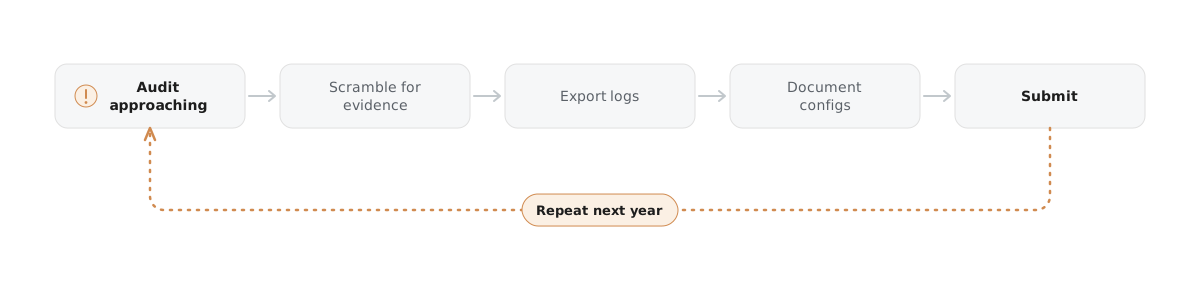
The CloudInspector approach enables this instead:

This is not just about saving time at an audit event. It is about catching compliance gaps when they happen — not twelve months later when a surveillance auditor finds them first. When the auditor asks for an ISO 27001 report on a given control, you produce a point-in-time export — optionally as CSV — instead of starting a fire drill.
Scaling from Startup to Enterprise
The compliance burden does not scale linearly with organization size — it scales with complexity. A small team running a single Kubernetes cluster may face surprisingly heavy documentation overhead if that cluster powers a regulated product. A large enterprise may run dozens of clusters across multiple environments, each requiring its own compliance evidence trail.
CloudInspector is designed to serve both ends of this spectrum:
For smaller teams: The value is visibility without overhead. You get a continuously maintained asset inventory and change log without deploying a dedicated compliance engineering team. The interactive graph makes complex infrastructure understandable for people who aren’t Kubernetes experts — including the compliance officer, the external auditor, or the management stakeholder who needs to sign off on the risk register.
For larger organizations: The value is consistency at scale. As a multi-cluster Kubernetes monitoring solution, CloudInspector provides a unified view with environment-level filtering across development, staging, and production. Cross-environment comparison, version tracking across environments, and centralized ownership information make governance tractable even at significant scale.
Built in the EU, Runs Entirely In-Cluster
For regulated industries and data-sovereignty-conscious organizations, where compliance evidence lives matters as much as what it contains. CloudInspector is a Kubernetes monitoring platform without external connections: the agent runs entirely within your infrastructure, no data leaves your environment, and it works in air-gapped and on-prem deployments. For teams that require EU data residency or a self-hosted, no-SaaS model, this means the tooling itself does not become a new supplier risk or a cross-border data transfer to document.
What’s Coming: AWS, GCP, and Azure
Kubernetes clusters are rarely an island. Most organizations running cloud-native workloads also use managed cloud services — S3 buckets, RDS instances, managed queues, serverless functions, IAM roles, and more. These resources sit outside the Kubernetes API but are deeply relevant to ISO 27001 compliance.
CloudInspector’s roadmap includes extending the continuous asset recording model to AWS, GCP, and Azure. When cloud provider resources are included, the compliance picture becomes complete — and CloudInspector becomes a broader set of cloud compliance tools rather than a Kubernetes-only solution:
- IAM policy sprawl across AWS accounts becomes visible
- Unencrypted S3 buckets are flagged alongside Kubernetes misconfigurations
- Cross-service dependency graphs include both Kubernetes workloads and the cloud services they consume
- Supplier relationship documentation (Control Area 10) gains direct evidence from cloud resource metadata
The architectural foundation being built today for Kubernetes — continuous recording, point-in-time exports, dependency graphs, change logs — translates directly to cloud provider resources. Organizations that adopt CloudInspector now will benefit from a consistent compliance model as the platform expands.
Practical First Steps
If your organization is pursuing ISO 27001 certification or managing annual surveillance audits, here is a practical starting point with CloudInspector:
-
Deploy the CloudInspector agent into your Kubernetes cluster. It runs entirely within your environment — no data leaves your infrastructure, no external connections are required.
-
Let it record. Within the first 24-48 hours, you have a baseline inventory and the change log begins accumulating.
-
Walk through the 12 control areas with your compliance team using CloudInspector’s graph view. Identify gaps — services with no network policies, workloads with no clear owner, RBAC roles that appear overly permissive.
-
Export point-in-time snapshots to establish your audit baseline. Schedule regular exports — including CSV compliance exports — as part of your ISMS review cycle.
-
Use the change log as your change management evidence. Every deployment, configuration change, and scaling event is timestamped and traceable.
Conclusion
ISO 27001 is not a document. It is a system, a continuous process of identifying risk, implementing controls, monitoring their effectiveness, and improving over time. The moment you treat it as a point-in-time exercise, it starts working against you.
Kubernetes environments amplify this problem because they are inherently dynamic. Assets appear and disappear. Configurations change. Versions proliferate. Without continuous visibility, the gap between your documented security posture and your actual infrastructure widens every week.
CloudInspector brings continuous, structured visibility to Kubernetes — making asset inventory, change management, dependency mapping, and evidence collection operational rather than ceremonial. It does not replace your ISMS, your risk register, or your auditor. But it gives your compliance team reliable, timestamped ground truth to work with, and gives your engineering team the visibility they need to catch problems before they become findings.
The certification treadmill doesn’t have to be a scramble. With continuous asset recording as your foundation, ISO 27001 compliance becomes something you maintain every day, not something you reconstruct every twelve months.
