
ITIL frameworks were designed for a slower kind of infrastructure. A server gets racked, ticketed, approved, documented. Changes move through formal windows. The CMDB stays current because human beings update it.
That model doesn’t hold in Kubernetes. A routine deployment touches dozens of resources in under a minute. Autoscalers create and destroy pods continuously. CI/CD pipelines bypass manual steps by design. The change records, asset inventories, and incident procedures still exist, but the data feeding them is stale almost by default.
Where things tend to go wrong
CMDBs fall behind fast. There is no practical way to manually track every Kubernetes resource across multiple clusters and environments. Resources get created by pipelines and operators that have no awareness of your configuration database. Teams do their best to keep records updated, but it is a losing battle at any meaningful scale.
Post-change audit trails are sparse. When something breaks after a deployment, reconstructing what actually changed, and when, usually means piecing together git history, deployment logs, and memory. If the change happened outside a formal window, there may be nothing to piece together.
Incident triage takes longer than it should. Finding the dependency chain of an affected service across namespaces and clusters is not something most ITIL tools can show you. On-call engineers end up doing it manually, burning time they do not have.
Release verification is a manual step that often gets skipped. Confirming that a release actually landed in the intended state (right versions, no leftover resources from the previous deployment) requires someone to go check. It is the last step of the ITIL release management process that tends to disappear under deadline pressure.
These are not process failures exactly. They are what happens when processes designed for slow, deliberate infrastructure try to keep up with automated, continuous deployment.
Continuous infrastructure mapping
The core problem is a data problem: ITIL processes need an accurate picture of what exists and what changed, and getting that picture from fast-moving cloud infrastructure requires continuous, automated collection.
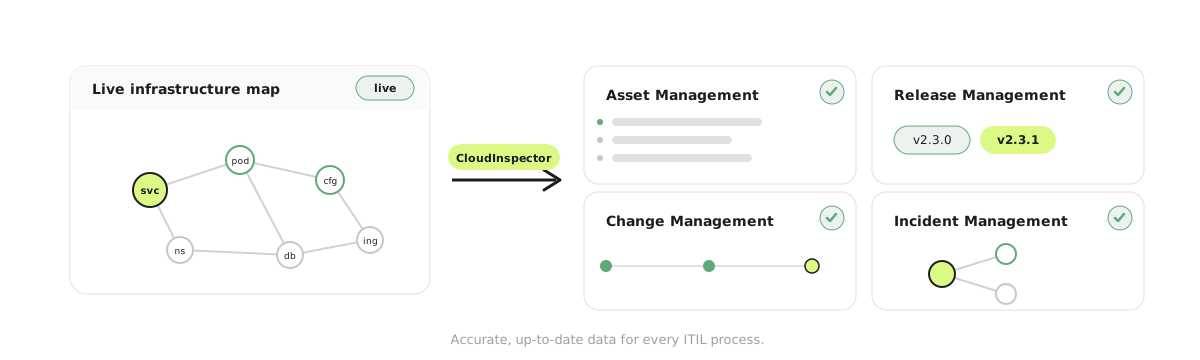
CloudInspector scrapes Kubernetes clusters continuously and builds a live map of your infrastructure. Every resource, such as Deployments, Services, Pods, ConfigMaps, and Namespaces, is mapped as a node. Every relationship between resources is a connection. The map updates on its own; no one has to tell it that a resource was created or deleted.
What makes this useful for ITIL specifically is that the map has history. You can see what existed at any point in the past, what changed between two timestamps, and how resources relate to each other. That is the raw material most ITIL processes need and rarely have.
Here is what that looks like in practice.
ITIL asset management and the CMDB problem
Service Asset and Configuration Management sits underneath most other ITIL processes. Change management, incident management, and release management all depend on knowing what configuration items exist and how they relate to each other. When the CMDB is incomplete or outdated, those processes degrade too.
CloudInspector’s Cloud Asset Inventory keeps a running record of every Kubernetes resource across your clusters. Each resource is a configuration item, and its relationships to other resources are preserved. When a Deployment is created, it appears in the map. When a Pod dies, it is marked with an end timestamp. No manual entry required.
The Ownership Overview adds the organizational layer. If a Deployment has an owner label, that ownership propagates through the map to all of its child resources. Pods without direct ownership annotations inherit from their parent. This matters for incident triage and change-impact scoping: you need to know who to contact, not just what broke.
For audits, the Point-in-Time Export generates a snapshot of your infrastructure state at any given moment as CSV. Auditors get a verifiable record, and you do not have to compile one by hand.
ITIL release management: which version is running where
The ITIL release management process assumes you know what is deployed in each environment. In practice, that is often unclear, especially across multiple clusters or when deployments happen frequently.
The Version Matrix gives you this per component: the current version by environment, the history of previous versions with start and end timestamps, and a side-by-side comparison between environments. If staging and production are supposed to match and do not, that shows up here.
The Deployment Journey View tracks where a component has been over time: which clusters, which namespaces, and in what order. This is useful for reconstructing the deployment history of a specific version during a post-release review or postmortem.
If components carry version labels or release annotations, the Release History treats each version change as a release entry. You get a timeline that can be cross-referenced against your change records or release tickets.
Post-release, you can compare the current map against the expected state. If a ConfigMap did not get deployed, or an old Deployment is still hanging around, it shows up as a discrepancy rather than something you would have to hunt for manually.
ITIL change management: what moved and when
Change management depends on knowing what changed, when, and whether it was authorized. In Kubernetes environments, changes happen continuously and often outside formal windows.
The Change Log records every infrastructure change as it happens: new resources, deleted resources, and config changes. A few things this is useful for:
- Spotting unauthorized changes. If a resource was created or modified without a corresponding approved change record, the timestamp discrepancy is visible in the log. No integration with your ticketing system is needed to see it.
- Post-change verification. After a planned change, the map shows the current state. If it does not match what the change record said should happen, you know before it becomes a problem.
- CAB documentation. Before-and-after snapshots of the infrastructure map serve as evidence for Change Advisory Board records.
Filtering the Change Log by owner or team narrows it to relevant services, which helps when a Change Manager needs to scope what a particular team’s environment looked like around a specific change window.
ITIL incident management: two questions on a timer
The ITIL incident management process cares a lot about MTTR. Most of the time lost in incident triage goes to the same two questions:
- What does this service depend on?
- What changed before this started?
The Incident Analysis view addresses both. Using the time slider, you scope the period around the incident and get a list of all infrastructure changes in that window, filtered to service-level events rather than pod noise. Clicking into a service shows its part of the dependency map and which other services, ingress points, or databases it connects to structurally.
It is worth being clear about what this is not: it will not show you live network traffic between services (that requires eBPF-based observation at the network layer, which only works on newer clusters). What it does show is structural dependencies, such as ownership hierarchies and Kubernetes relationships, which is often enough to scope the problem and point the investigation in the right direction.
Governance: ownerless resources and policy violations
Ownerless or misconfigured resources accumulate gradually. A test namespace never gets cleaned up. A Deployment loses its owner label during a refactor. A Pod runs without any associated Service. None of this surfaces unless you go looking for it.
The Shadow IT Detection feature lets you define filter rules for exactly this: resources missing required labels, Pods without a parent Deployment, Services without a gateway, or resources with no owner annotation. Anything matching shows up flagged in the map.
For periodic compliance reviews, this is more practical than running kubectl get all -A across every cluster and sorting through the output manually. You get a structured list of policy violations, with ownership context where it exists.
What it does not replace
Established ITSM platforms like ServiceNow, Jira Service Management, and BMC Helix handle workflow well: approval chains, ticket tracking, and audit records for human decisions. That is not what CloudInspector does.
CloudInspector is a discovery and history layer. It knows what is running, how it is connected, and what changed. It does not manage tickets or approval workflows. The two sit at different levels of the stack and complement each other more than they overlap.
Current limitations of CloudInspector for ITIL
Kubernetes only. AWS, Azure, and GCP resource discovery is planned but not available yet. If most of your infrastructure is Kubernetes, this is not a blocker. If cross-cloud asset visibility is the primary requirement, it is worth knowing upfront.
Structural dependencies only. The dependency map shows Kubernetes ownership and resource relationships, not live network traffic. Mapping which service actually calls which at runtime requires network-level observation (eBPF), and that only works on newer cluster versions.
No ITSM integration. Changes detected in CloudInspector do not automatically sync to ServiceNow or Jira change records. Correlating the two is currently a manual step. Please contact us if you are interested in this feature.
Kubernetes environments do not fit neatly into ITIL’s original assumptions about the pace of infrastructure change. But the underlying goals, knowing what you have, tracking what changed, and understanding impact before acting, are just as relevant.
The problem is mostly a data problem: getting accurate, timely infrastructure information into the hands of change managers, release managers, and incident responders without requiring manual effort to maintain it. Check out the CloudInspector use cases and how we can help you!
